| |
|
|
Additional activation keysYou can now purchase additional activation keys for your Alcohol serial number; this means that you will now be able to install Alcohol on more than one PC\OS without having to switch your activation each time.
To purchase additional activations simply log into your account on our sales site here http://users.alcohol-soft.com/login.php
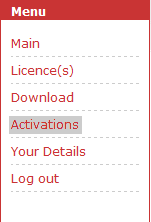
Once logged into your account you need to go to Activations

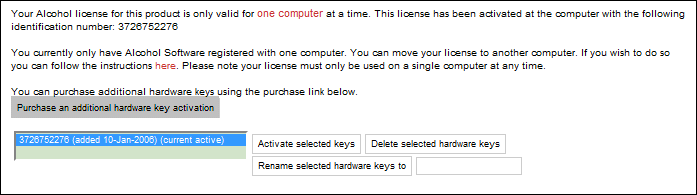
The activations page window will open, to purchase extra activations for your serial number simply click on the “Purchase an additional hardware key activation”
You will then be taken to our online merchant to complete your purchase.
Additional activation key prices are 1 year = 10 euro + VAT Lifetime= 20 Euro + VAT
You will not be issued with a new serial number your present serial number will now be able to be used on another PC\OS without the need to keep switching activations.
Please see the FAQ below for instructions on how to use your additional activation.
………………………………………………………..
Once you have purchased your additional activation please log into your account here http://users.alcohol-soft.com/login.php and go to the activations page as described above
You will now see the following text “your Alcohol license for this product is valid for 2 computers at a time” This includes a single computer with dual boot OS.

If you have previously switched activations between PCs or your hardware key has changed you may see some none active hardware keys in your account please delete these at this time so as to avoid confusion.
You should now download and install Alcohol onto your second PC\OS when you come to activate you will receive a pop up message

This is normal at this stage please log into your account http://users.alcohol-soft.com/login.php and go to the activations page again. You will now see two hardware keys in your activations box one will be marked as active the other not.

You now need to set both keys to active, to do this use your left mouse button to highlight both hardware keys. Then click on the “Activate selected keys” button
The following window will pop up; please simply click OK as this window has no relevance for additional activation key.

You should now see that both Hardware keys are marked as active

You now need to go back to the freshly installed Alcohol and re enter your serial number and email address, Alcohol will now be activated.
|
|
| |
|